This is post 2 of our five-part educational series on cable support and cable management. Post 1 covered why ceiling tiles and grids are not cable supports. Here is what should carry the cable instead.
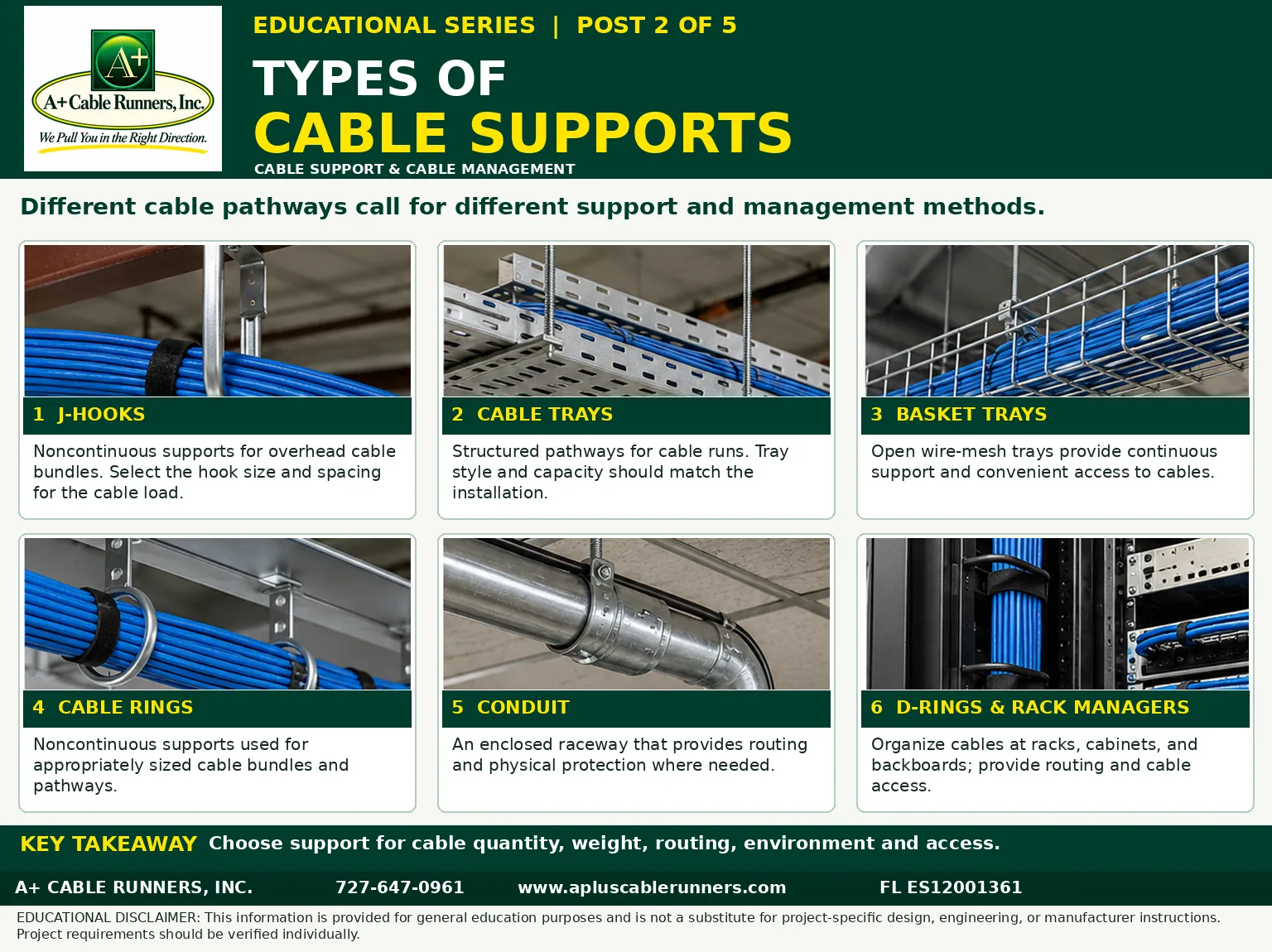
Different cable pathways call for different support and management methods. There is no single right answer for every building: the choice depends on how many cables there are, how heavy the bundle is, where it has to go, the environment it runs through and how often someone will need to get at it.
1. J-hooks
J-hooks are noncontinuous supports for overhead cable bundles: a series of hooks fastened to the building structure along the route, each carrying the bundle for the stretch until the next one. They are common above suspended ceilings. Select the hook size and spacing for the cable load. As one reference point, hardware maker nVent's J-hook data sheets state that non-continuous supports may not be spaced more than 5 feet (1.5 meters) apart, citing the TIA-569-C pathways standard, section 9.7.
2. Cable trays
Cable trays are structured pathways for cable runs, supporting the cable continuously along the route. Trays come in several styles and sizes, and the tray style and capacity should match the installation, including room for cable that will be added later.
3. Basket trays
Basket trays are open wire-mesh trays. They provide continuous support and convenient access to the cables, which makes adding or tracing a run easier.
4. Cable rings
Cable rings are noncontinuous supports, like J-hooks, used for appropriately sized cable bundles and pathways. As with any support, the ring has to fit the bundle it carries.
5. Conduit
Conduit is an enclosed raceway. It provides routing and physical protection where needed, such as where cable runs exposed or could be damaged. One caution from the electrical code: communications cable should not be strapped, taped or otherwise attached to the outside of electrical raceways as a means of support.
6. D-rings and rack managers
Inside network closets, D-rings and rack cable managers organize cables at racks, cabinets and backboards. They give each cable a defined route and keep cable reachable for changes, which makes the closet easier to service.
Key takeaway
Choose the support for cable quantity, weight, routing, environment and access. Many buildings use several types: J-hooks or tray above the ceiling, conduit where protection is needed and rack managers in the closet. Whatever the type, support hardware should be securely attached to the building structure, or to separate support wires installed for the cabling, not to the ceiling grid or the ceiling's own wires.
When you compare cabling quotes, ask what pathway each contractor plans to use and whether it is included in the price. Post 3, publishing tomorrow, covers what happens to the cable itself during and after installation: sag, pulling tension and bend radius. To see the cabling work we do, visit our computer network cabling page.
Information is provided for general education. It is not a substitute for project-specific design, engineering or manufacturer instructions. Project requirements should be verified individually.